
Technology never stands still — and neither do your visitors’ expectations. A website that felt modern and effective two or three years ago can appear dated, slow, and difficult to navigate by today’s standards. If your site has not had a deliberate refresh recently, you may already be losing organic visibility and enquiries without realising it.
The good news is that a full rebuild is rarely necessary. Targeted updates to your UX, site structure, on-page content, and conversion paths can dramatically improve both your search rankings and the results your website delivers — whether your goal is to generate leads, attract readers, or build trust with prospective clients.
In this guide, we explain exactly how to update existing content for SEO, how to improve your website’s user experience and journey, and the high-impact changes that help you outperform competitors in search. You can also read our related guide on sustainable SEO strategy for a longer-term view.
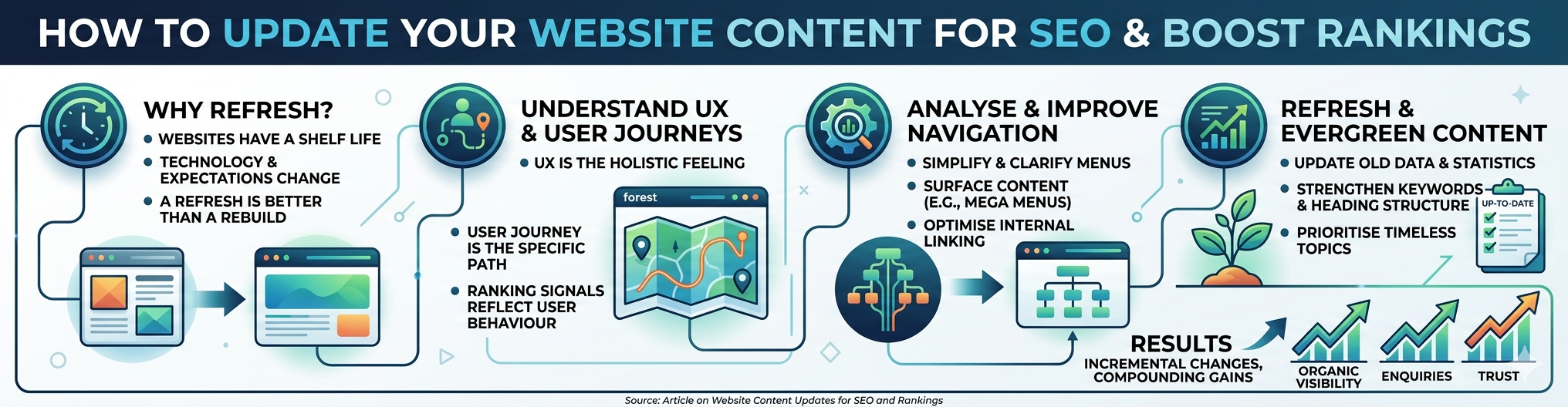
Why every website has a shelf life (and how to revive yours)
Your services, products, or content may be excellent — but if the way they are presented online has not kept pace with how people expect to browse and interact with websites, you are working against yourself. Visitors will have encountered faster, better-structured websites that make finding information feel effortless. If yours does not meet that standard, they will leave.
A complete redesign can be expensive and disruptive, particularly if your site has been performing reasonably well for years. But staying still is its own risk. Search engines and users both reward sites that are well-maintained, clearly structured, and easy to use. A targeted content and UX refresh almost always delivers a better return than starting from scratch.
From our experience working with businesses across a range of sectors, a focused refresh consistently delivers measurable improvements. See our case studies for real-world examples of what targeted changes achieve.
Understanding UX and user journeys
These two terms are used constantly in web strategy, often interchangeably — but they describe different things, and both matter for SEO and business performance.
UX (user experience) is the holistic perception and quality of interaction a visitor has with your entire website: how it looks and feels, how quickly it loads, how trustworthy it appears, and how easy it is to find information. The user journey, by contrast, is the specific sequence of steps a visitor takes to achieve a particular goal — reading an article, making an enquiry, downloading a resource, or completing a purchase.
A practical way to think about it: UX is the forest, and the user journey is the trail through that forest. UX shapes the entire environment. The user journey is the specific route a visitor takes to get somewhere within it. Both need to be in good shape — a well-designed environment with no clear paths loses visitors just as surely as a clear path through a confusing environment.
Why does this matter for SEO? Because Google’s ranking signals increasingly reflect real user behaviour. Bounce rate, time on page, and engagement rate are all proxies for UX quality. Our post on website trust signals explores how credibility and UX work together to keep visitors on your site longer.
The business case for investing in UX
88% of online users say they would not return to a website after a poor experience (Toptal).
Good UX design can increase website conversion rates by up to 200%; excellent UX design can lift that to 400% (Forrester Research).
Every £1 / $1 invested in UX returns approximately £100 / $100 — a 9,900% ROI (Forrester Research).
93% of people expect a website to be at least as easy to use as a comparable in-person experience (Coveo).
These figures apply to websites of all types. For a deeper dive into the data, Baymard Institute’s UX research and Forrester’s ROI of UX report are the authoritative sources.
Analyse Competitors and Improve Your Site's Navigation
Before making changes to your own website, spend time auditing the sites that are ranking above you. How do they structure their navigation? How many clicks does it take to reach a key page? How clearly do their menus communicate what they offer? Tools like Screaming Frog, Ahrefs, or even a straightforward manual walkthrough can reveal patterns and opportunities.
Simplify and surface — the case for better menus
One of the most impactful navigation improvements for any website is replacing a cluttered or ambiguous menu with one that clearly reflects how visitors think about your content or services.
For larger sites with multiple categories or service areas, a Mega Menu is worth considering: an expanded navigation panel that displays multiple categories, links, and sometimes supporting imagery in a single, organised view. Unlike a basic dropdown, it uses a two-dimensional layout to surface a broader range of pages at once — reducing the number of clicks a visitor needs and lowering bounce rate, both positive signals for search engines.
For smaller sites, the principle is clarity over comprehensiveness. Fewer, better-labelled navigation items almost always outperform long menus. If a visitor cannot immediately understand where to go, they will leave.
Internal linking and site crawlability
While reviewing your navigation, audit your internal links. Every important page should be reachable within three clicks from the homepage. Pages with no internal links pointing to them are effectively invisible to Google. Our guide on comprehensive SEO audits walks through exactly how we approach this for clients.
A clear, logical site structure doubles as a sound internal linking strategy. For further reading, Moz’s guide to internal linking is a reliable external reference.
How to update existing content for SEO: Refresh and evergreen your pages
Visit a website with blog posts dated two or three years ago and you sense something immediately: the business has either lost interest in its site, or simply run out of time to maintain it. Outdated references, stale statistics, and old imagery all chip away at visitor trust — and signal to Google that the content may no longer be reliable.
The answer is not to delete old content. Existing pages carry accumulated authority, backlinks, and indexed positions in search results. Delete them carelessly and you lose all of that. Instead, update them.
A practical framework for updating existing content
Use Google Search Console to audit pages older than 18–24 months. Look for those that have dropped in rankings or lost organic traffic since they were first published.
- Update statistics and citations. Outdated figures undermine credibility. Replace them with current data and link to reputable external sources.
- Revisit keyword targeting. Use Google’s “People also ask”, Semrush, or Surfer SEO to find related terms your original content missed.
- Improve heading structure. Every page should have a single H1, clear H2 subheadings, and H3s for supporting detail — as modelled in this article.
- Strengthen internal links. Update older posts to point to newer, relevant content and vice versa.
Update the published date only after making substantive improvements — not as an empty tactic.
Building evergreen content from the start
If you are creating new content, prioritise topics that remain relevant and searchable regardless of season or news cycle: how-to guides, explanatory articles, comparisons, and answers to questions your audience consistently asks. Evergreen content compounds in search value over time.
The same discipline applies to imagery. Outdated photography undermines the credibility of otherwise strong content. Refreshing visuals is one of the lowest-cost, highest-impact updates you can make to an existing page.
For a broader look at future-proofing your website content, see our post on the pillars of a future-proof website.
Optimise your conversion paths to turn visitors into results
You may now have a well-structured website with clear navigation and up-to-date content — but if the paths that lead visitors towards your key goals are unclear, broken, or unnecessarily complicated, that effort will not translate into enquiries, sign-ups, or sales.
This applies to any type of website. For a service business, the conversion path leads to an enquiry form or a phone call. For a content publisher, it leads to a newsletter subscription or a return visit. In each case, the same principles apply.
Why conversion paths break down
The median bounce rate across all website types is 44% — meaning nearly half of all visitors leave without taking any meaningful action (Databox, 2024).
A one-second delay in page load time can reduce conversions by 7% (Kissmetrics). 40% of visitors abandon a page that takes more than three seconds to load.
Good UX design can increase conversion rates by more than 200% — poorly designed pages actively drive visitors away (Forrester Research).
For specific tactics around mobile conversion, our article on mobile conversion optimisation techniques covers five proven approaches. For a deep dive into the UX research behind these numbers, Baymard Institute’s UX statistics is the definitive reference.
What a high-performing conversion path looks like
- One clear goal per page. Every important page should guide the visitor towards a single, obvious next step. Pages that try to do everything convert poorly.
- Remove unnecessary friction. Long forms and unclear instructions reduce the likelihood of a visitor completing an action. Reduce steps to the minimum required.
- Build trust visibly. Client logos, testimonials, accreditations, and a clearly written privacy statement placed near a call to action directly improve conversions.
- Make it fast. Site speed is both a ranking factor and a conversion factor. Compress images, use modern hosting, and test load times regularly on desktop and mobile.
- Design for mobile first. Mobile devices account for more than 50% of web traffic globally. A site that is difficult to navigate on a smartphone is losing more than half its potential visitors.
Less is more. The fewer decisions a visitor has to make and the more clearly the next step is signposted, the more likely they are to take it.
Final Thoughts: Small Changes, Big Impact
A focused website refresh — improving how content is structured, how visitors are guided, and how clearly your goals are communicated — can have a significant effect on both search rankings and business outcomes. A complete overhaul is sometimes the right call, but in most cases targeted, data-led improvements deliver better and faster results.
The key is to approach each area methodically: audit before acting, use data to prioritise, and measure results after every meaningful change. That is how incremental improvements compound into sustained ranking gains and real-world results.
If you’d like help auditing or refreshing your website, explore our SEO services or WordPress website care plans, or get in touch to discuss your specific goals.
Frequently Asked Questions
How often should I update my website content for SEO?
Review your most important pages — service pages, key landing pages, and core blog articles — at least every six to twelve months. Prioritise pages that have lost rankings or where the information is visibly outdated. Even modest updates — a revised paragraph, a new statistic, an updated image — can positively affect a page’s position in search results.
What is the difference between UX and a user journey?
UX (user experience) refers to the overall quality of a visitor’s interaction with your website — encompassing design, load speed, clarity, and trust. A user journey is the specific sequence of steps a visitor takes to achieve a goal, such as reading an article, making an enquiry, or downloading a resource. Both need to be optimised: good UX creates a positive environment, while a well-designed user journey ensures visitors can reach their destination with minimal friction.
Does improving site navigation help with SEO?
Yes, significantly. Clear navigation helps search engines crawl and index your pages more effectively, improves internal linking, and reduces bounce rate — a key indicator of user satisfaction. It also makes it easier for visitors to discover pages they would otherwise miss, which increases time on site and the likelihood of conversion.
What is evergreen content and why does it matter for SEO?
Evergreen content covers topics that remain relevant and searchable year-round — how-to guides, explanatory articles, comparisons, and answers to questions your audience consistently asks. Because evergreen content continues attracting organic traffic long after publication, it accumulates authority and backlinks over time, making it among the highest-return investments in any content strategy.
How do I update old web pages for SEO without losing my current rankings?
Keep the existing URL unchanged, update the content substantively (new data, improved headings, strengthened internal links, refreshed imagery), and update the published or reviewed date only after making meaningful changes. Avoid deleting and republishing as a new page — you will lose any existing link equity and ranking history attached to the original URL.
What is a good bounce rate for a website?
Benchmark bounce rates vary by website type and industry. A rate between 26% and 40% is considered strong for most websites; 41% to 55% is average; 56% to 70% is higher than ideal but common for content-heavy pages and blogs. The more useful question is whether your bounce rate is trending in the right direction over time, and whether high-bounce pages are ones where engagement genuinely matters to your goals.
How important is page speed for SEO and conversions?
Extremely important. Google uses page experience signals, including Core Web Vitals, as ranking factors. A one-second delay in load time can reduce conversions by 7%, and 40% of visitors will abandon a page that takes more than three seconds to load. Compressing images, using modern hosting, and minimising unnecessary scripts are all straightforward, high-value optimisations.
Do I need to rebuild my website to improve its SEO performance?
Rarely. In most cases, a targeted refresh — updating and restructuring existing content, improving navigation clarity, strengthening internal links, and optimising key conversion paths — delivers better results more quickly than a full rebuild. A rebuild resets accumulated authority, disrupts indexed URLs, and introduces new technical risks. Unless your site has fundamental structural problems that cannot be fixed incrementally, a well-planned refresh is almost always the smarter starting point.