
In July 2026, Google rolled out Platform Properties, a new property type in Search Console built for content that doesn’t live on a website. Until now, seeing how your posts performed in Google Search meant owning a verified domain. If you ran an Instagram-first boutique, posted TikToks for a living, or built a brand entirely on X, you had no way to see that data at all.
Platform Properties closes that gap. You can now track how your Instagram, TikTok, X, and YouTube content shows up in Google Search, Discover, and Google News, without owning a single URL.
What platform properties does
For over 20 years, Search Console was tied to domains: you verified a website, and the tool showed you how that website performed. Platform Properties breaks that link. Instead of verifying a URL, you verify a social or video account, and Google shows you the same category of data (queries, clicks, impressions, position) for that account’s public posts.
That matters because a lot of search behavior has already moved off websites. Someone looking for a recipe lands on a TikTok video. Someone checking a product review ends up on an Instagram Reel. Google has been indexing that content for a while; now you can finally see how it performs.
What’s not covered yet: Only Instagram, TikTok, X, and YouTube are supported at launch. Facebook, LinkedIn, and Threads aren’t included. Google hasn’t committed to a timeline for adding them, so if a client leans heavily on those platforms, set expectations accordingly.
What you can actually see
Each platform property gives you three reports, per Google’s documentation:
- Performance report: total clicks, impressions, click-through rate, and average position, broken down by the exact search queries sending traffic to a given post.
- Insights report: which query groups are trending up or down, a 24-hour filter for catching a post that’s suddenly spiking, and the ability to export data across platforms into one spreadsheet to compare Instagram against TikTok against YouTube for the same topic.
- Achievements report: click-based milestones tracked on a rolling 28-day window, useful for showing a team or client that social content is contributing to search traffic on an ongoing basis, not just as a one-off number.
The practical use cases fall into a few buckets: spotting an old post that’s regaining search traction (worth refreshing the caption or pinning), finding out a Reel made for brand awareness is actually ranking for high-intent informational keywords, and comparing short-form against long-form video for the same subject.
How to set it up
You don’t need any technical background, just access to the accounts you’re verifying.
- Log in to Search Console with your primary Google account.
- Open the property selector in the top left and click Add property.
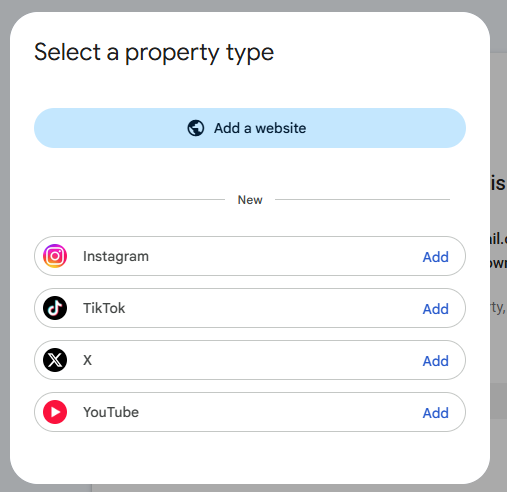
- Choose a platform: Instagram, TikTok, X, or YouTube.
- Follow the prompts to sign in to that platform and authorize Google to verify ownership.
- Repeat for each additional platform.
Each platform is its own property. If you’re tracking TikTok, X, and Instagram, that’s three separate setups, not one. Expect a delay of a few days before data starts populating, and don’t read too much into the numbers until you’ve got at least a full 28-day window.
The catch for agencies
Setup is simple for a single creator who controls their own logins. It’s slower for an agency managing multiple clients: each platform property needs direct account access, and that access often sits with a client’s in-house team or an outside creator rather than the agency itself. Ten clients across all four platforms is 40 separate verification flows, and the bottleneck is negotiating access, not the technical setup itself. One shortcut exists: accounts already claimed through a Search profile are added automatically, but that’s gated by follower thresholds (100,000 on YouTube, Instagram, or X; 300,000 on TikTok), so it won’t help most smaller clients.
Why this matters for your SEO strategy
Platform Properties gives you first-party data on something you previously had to guess at: how your social content performs in search, not just in-app. That’s a real input for content strategy, not just a vanity metric. A post that’s ranking for unexpected queries tells you what to build on. A post regaining traction months later tells you what to refresh. And side-by-side platform comparisons tell you where a given topic actually performs best, rather than where you assumed it would.
If your team treats social and SEO as separate functions, this is a good forcing function to start aligning them.
Looking for more than just technical support? Explore our strategic digital solutions designed to help your agency and clients get more from their digital investment. No pressure, no complicated commitments — just practical solutions built around your goals, challenges and growth.
Frequently asked questions
Do I need a Search profile to use Platform Properties?
No. Search profiles are a separate feature gated by follower count (100,000 on YouTube, Instagram, or X; 300,000 on TikTok). Accounts that already have a claimed Search profile get added as platform properties automatically, but you can set up a platform property on its own without one, regardless of follower count.
Will this affect my existing website property in Search Console?
No. Platform properties are added alongside your existing domain or URL-prefix properties. Nothing about your website data changes.
Why is my new platform property showing no data?
New properties can take a few days to populate, and Google recommends waiting for a full 28-day window before drawing conclusions. An empty or partial chart in the first few days is expected, not a sign of a failed setup.
Does this track how content performs on the platform itself, e.g. TikTok's own algorithm?
No. Platform properties only show performance within Google Search, Discover, and Google News. They don’t report in-app metrics like a video’s TikTok view count or its performance in TikTok’s own feed.